
An accountant's clients want last year's return and the engagement letter. A design studio's clients want the proofs and the invoice. A manufacturer's dealers, the independent businesses that resell its products, want the current price sheet. Its distributors want the installation guide for the part that shipped last week, and its customers the safety data sheet and the drawing for the item they bought. The answers go out one email at a time, because the systems that know who these people are were never built to show them anything.
A portal fixes that: one login, and each client, dealer or customer sees the documents and pages meant for them. Total CMS builds one on your own site, beside your ERP if you run one rather than inside it.
This page's JumpStart builds one for Brightwater Filtration, a fictional maker of water filters. Brightwater sells through water-treatment dealers, the local shops that sell its systems to homeowners and service them, and through certified installers, the plumbers who fit them.
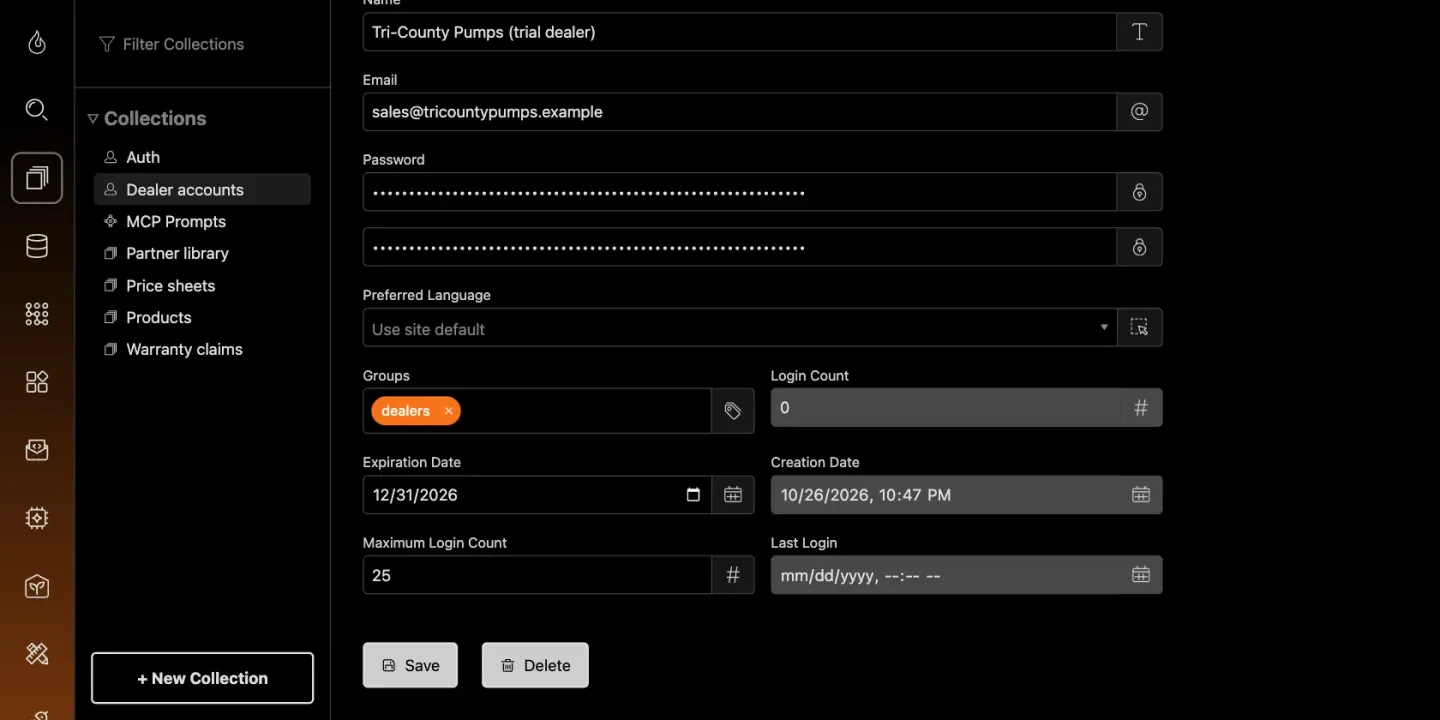
One login per client or company, grouped by who they are
Total CMS keeps its admin users in the default auth collection. Portal users go in a separate auth collection, so a client or dealer can sign in to the website but never to the dashboard. Give each account an access group (clients, dealers, distributors, approved customers, a region) and the rest of the portal follows from the group.
- Accounts can expire. Set an expiration date or a maximum number of logins, and sign-in stops when it runs out. That suits a client's access to a finished project, a trial dealer, or an account that lapses at the end of a contract.
- Password resets are built in, so a client who forgets theirs recovers access without calling you.
Pages and sections by group
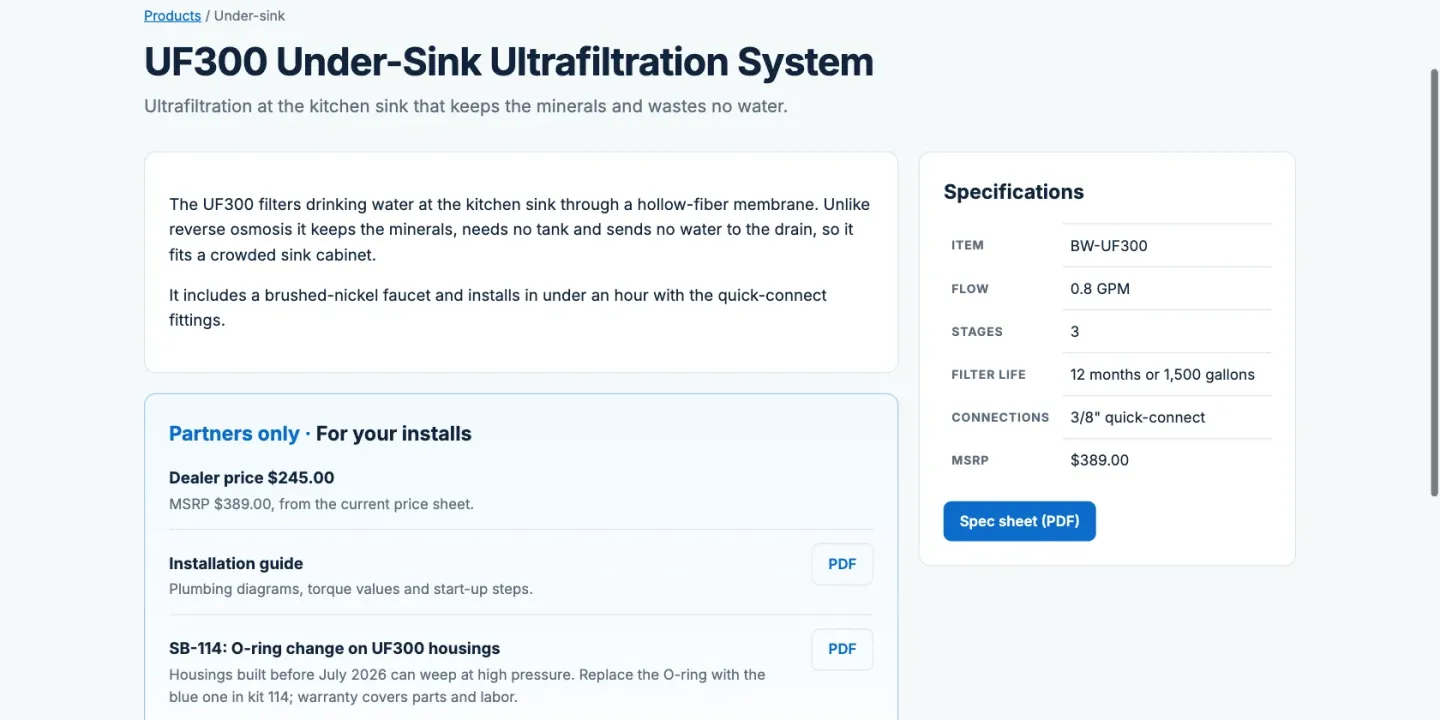
One page can serve everyone and still show each group its own part. A product page shows the specs and the spec sheet to the public, then a partners-only section to signed-in partners: the dealer price for dealers, the installation guide and service bulletins for dealers and installers. In a Site Builder template that is one line of Twig per section, checking the visitor's group. In Stacks, Section Lock does it without code, and Page Lock locks a whole page.
Site Builder can also lock a whole page to a group, and send anyone signed out to the sign-in for the portal's own accounts. In the sample, the warranty-claim page is locked to dealers: a signed-out dealer signs in and lands back on the form, and an installer is turned away.
Documents that stay behind the login
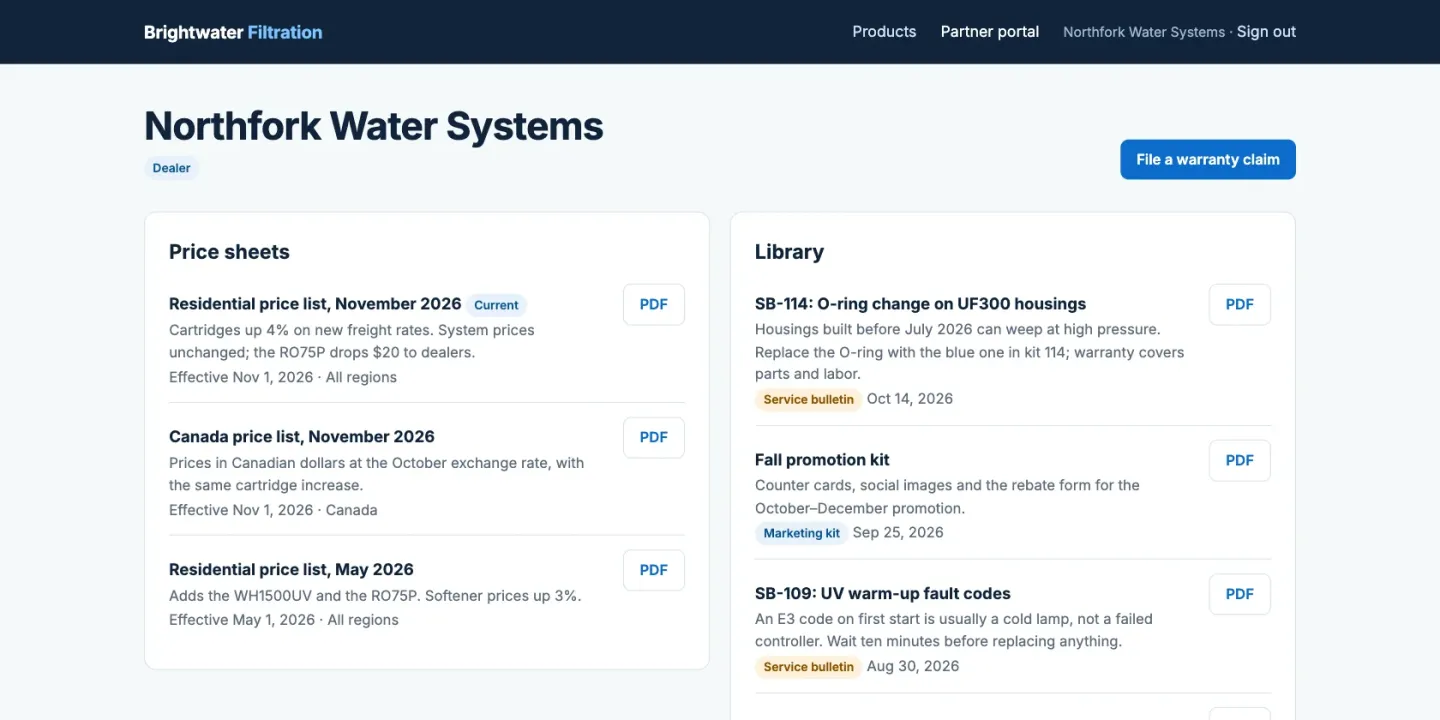
Price sheets, spec sheets, drawings, certificates and manuals go in file and depot fields: a single file, or a set of them, attached to the record they belong to. By default a file inherits the access rules of its collection, so a dealer-only price sheet doesn't become public because someone forwarded the link. Whoever opens that link signed out is asked to sign in, then gets the file if their group allows it. Files meant for everyone can be set public one field at a time.
Because documents are attached to records, they are found the way the reader thinks. A distributor opens the product and finds its manual, its drawing and its certificate on the same page, rather than searching a shared drive for a file name.
Kept in step with your ERP
A service firm's portal can skip this: its documents are uploaded by hand. For a manufacturer or supplier, the portal and the ERP meet on the item number. Use it as the object ID in your products collection, and each product page lines up with the ERP without a lookup table.
- Scheduled import. The ERP exports items (and, if you show them, prices) as CSV or JSON, and Total CMS imports the file, updating existing objects by ID. Run it by hand, or from a scheduled job on the server.
- REST API. Integration software you already run can create and update objects directly, with scoped API keys.
- Automations. Short PHP handlers can run on a schedule or when a webhook arrives from another system.
Keep ownership clean: prices and stock stay authoritative in the ERP and the sync refreshes them; descriptions, documents and guidance live only in Total CMS, so a sync never overwrites them. Total CMS alongside your ERP covers the patterns in more detail.
Forms that come back to you
Warranty claims, return requests, dealer applications, sample requests: each is a form that saves a structured record and emails it to the right person. Give the collection an owner and each dealer sees only the claims they filed; protect the status field and a dealer can file a claim but never approve one. Collections export to CSV, so the records can go back into the ERP or a spreadsheet.
Where it stops
- It isn't a client workspace. There are no e-signatures, invoices or message threads. If clients mostly sign, pay and talk to you in the portal, a dedicated client portal service does that better.
- It isn't an ordering system. Total CMS has no cart, quotes, credit terms or order history. If dealers need to place orders online, that belongs in the ERP's own portal or a B2B commerce tool; Total CMS can sit beside it and hold the documents and guidance.
- Prices are only as live as the sync. A nightly import means a price changed at noon appears tomorrow. If dealers must see the ERP's price to the minute, that needs an integration that writes on every change, or the ERP's own portal.
- It doesn't sign people in with your company directory. There is no single sign-on with Microsoft, Google or an identity provider; portal accounts have their own passwords.
- Someone has to build it. Groups, auth collections and locked pages are configuration, not a wizard. Plan on an in-house technical person or a freelancer.
What you need
- Standard covers custom auth collections, access groups, locked pages, and documents in the built-in depot schema.
- Pro for anything beyond the built-in schemas: a products collection keyed on the item number, with your own fields. Pro also adds the external REST API, API keys, webhooks and automations.
- Any host with PHP 8.2 or later, with no database to set up.

