

Every company has someone like Earl: the person who knows which material crumbles under heat, which supplier's spec sheet is optimistic, and which part to suggest when the catalog one is out. When a rep is stuck, the answer is "just ask Earl."
That knowledge is a business asset, and it lives in the least durable place there is. People forget details. Questions queue up behind one person's calendar. And when Earl retires, much of what he knows leaves with him. Across industries built by a generation now retiring, that's no longer a hypothetical.
This guide shows how to capture that knowledge in Total CMS and turn it into a pocket guide: a private, mobile reference that the experts maintain and everyone else uses.
This page's JumpStart builds one for Ostby Industrial Supply, a fictional distributor of mold-making, casting and sealing materials. Earl Medina is its materials expert, and the screenshots below come from his guide.
What a pocket guide is
A pocket guide is an internal web app with two sides. Subject-matter experts get forms to record what they know. Reps, installers, and new hires get a fast, mobile reference that answers the questions they would otherwise take to the expert.
It differs from a wiki or a shared drive in three ways:
- Structured, not free-form. Each product, material, or procedure has the same fields every time, so answers are comparable and searchable.
- Connected. A product links to its manufacturer, its competitors' equivalents, and the applications it suits. Reps follow those links the way the expert reasons.
- Honest. It's private, so it can hold the notes you would never publish, like "this one's crumbly above 400°F" or "order a size up from this supplier."
For a sales team, it answers the questions that eat an expert's day:
- Selection. Which product fits this customer's application?
- Competitive swaps. The customer uses a competitor's product; what's our closest match, and why?
- Substitutes. It's out of stock at this location; what else works?
- Slow movers. Is there something on the closeout list that suits this job and saves the customer money?
- Troubleshooting and calculations. Why did it fail, and how much material does the job need?
None of these come from a spec table alone. The sweet spot is knowledge that changes occasionally and gets read constantly.
Relationships are the spine
Without relationships, a pocket guide is just a list of pages. The value is in the links, because that's how an expert actually reasons: "if they're asking about that material, they probably also need this adhesive, and the competitor version runs hotter."
In Total CMS, each kind of thing gets its own collection, and a schema defines its fields. A relational field links an object to objects in another collection, so a product's form offers a dropdown of real manufacturers rather than a free-text box. A starting structure for an industrial supplier:
| Collection | Holds | Links to |
|---|---|---|
| Products | Item number, specs (density, hardness, temperature rating), photos, spec sheet, expert notes | Manufacturer, Applications, Competitor equivalents |
| Manufacturers | Name, logo, lead times, ordering quirks | — |
| Competitor products | Name, brand, comparable specs | The product that replaces it |
| Applications | Use case (mold making, casting, packaging), selection criteria | Recommended products |
Adjust it to your business; the pattern is what matters. One record per real-world thing, typed fields instead of paragraphs, and links instead of retyping. Relational dropdowns can be filtered and sorted, so an expert picking a competitor equivalent only sees active products.
Expect to invent your own groupings. The categories in your ERP were built for purchasing and accounting, not for how a rep chooses. You'll likely need a new grouping, say by application or by problem solved. Give it a name your ERP doesn't already use, so nobody confuses the two.
The docs cover how relational fields pull their options from another collection: Relational Options.
Two sides: experts write, everyone else reads
A pocket guide only stays accurate if the experts can keep it current themselves, without asking IT. So each side gets its own experience.
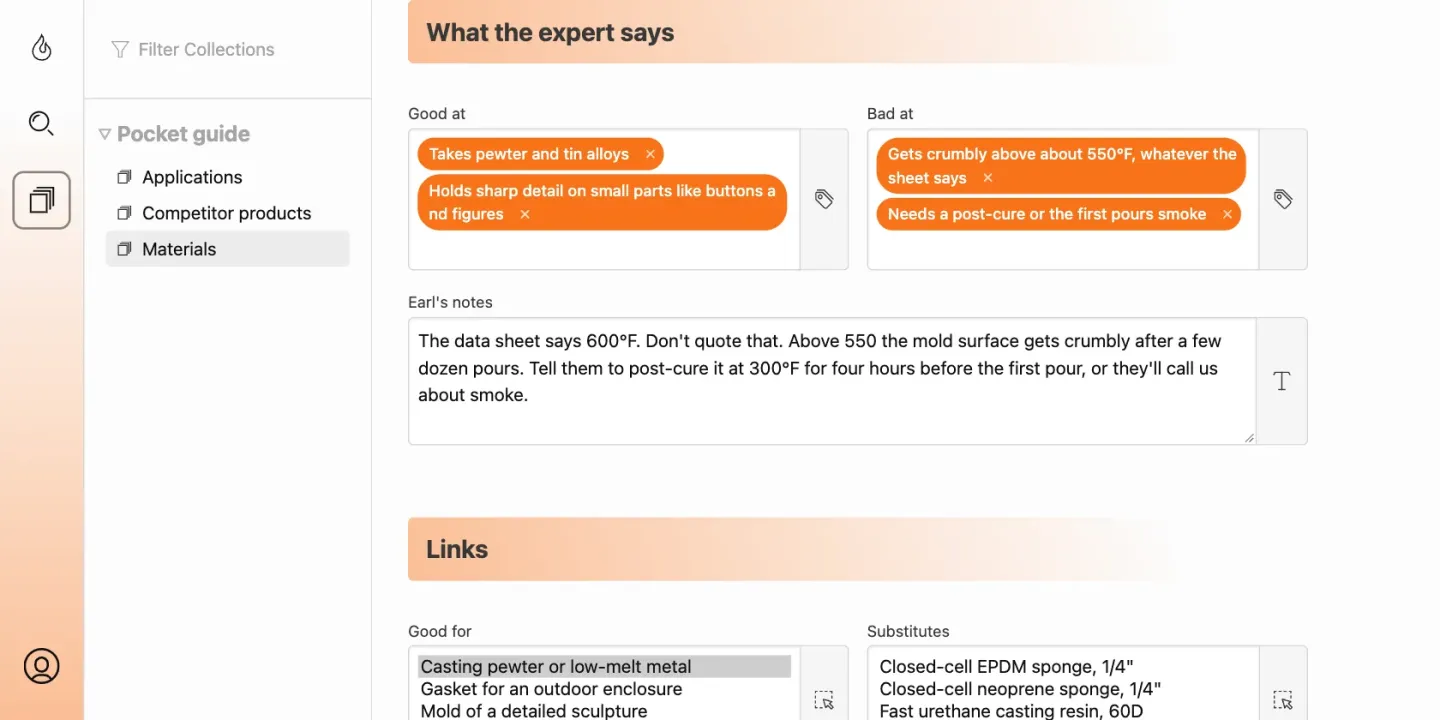
The expert side is the admin. Total CMS builds an editing form from each schema, with typed fields, dropdowns for related records, image and file uploads, and validation. An access group limits each expert to the collections they own. The materials engineer edits products and never sees anything else.
Most experts aren't comfortable with software, so keep their forms small and obvious. Use help text on every field, group related fields together, and give each expert a short path to the records they own. The less admin they see, the more they'll actually use it.
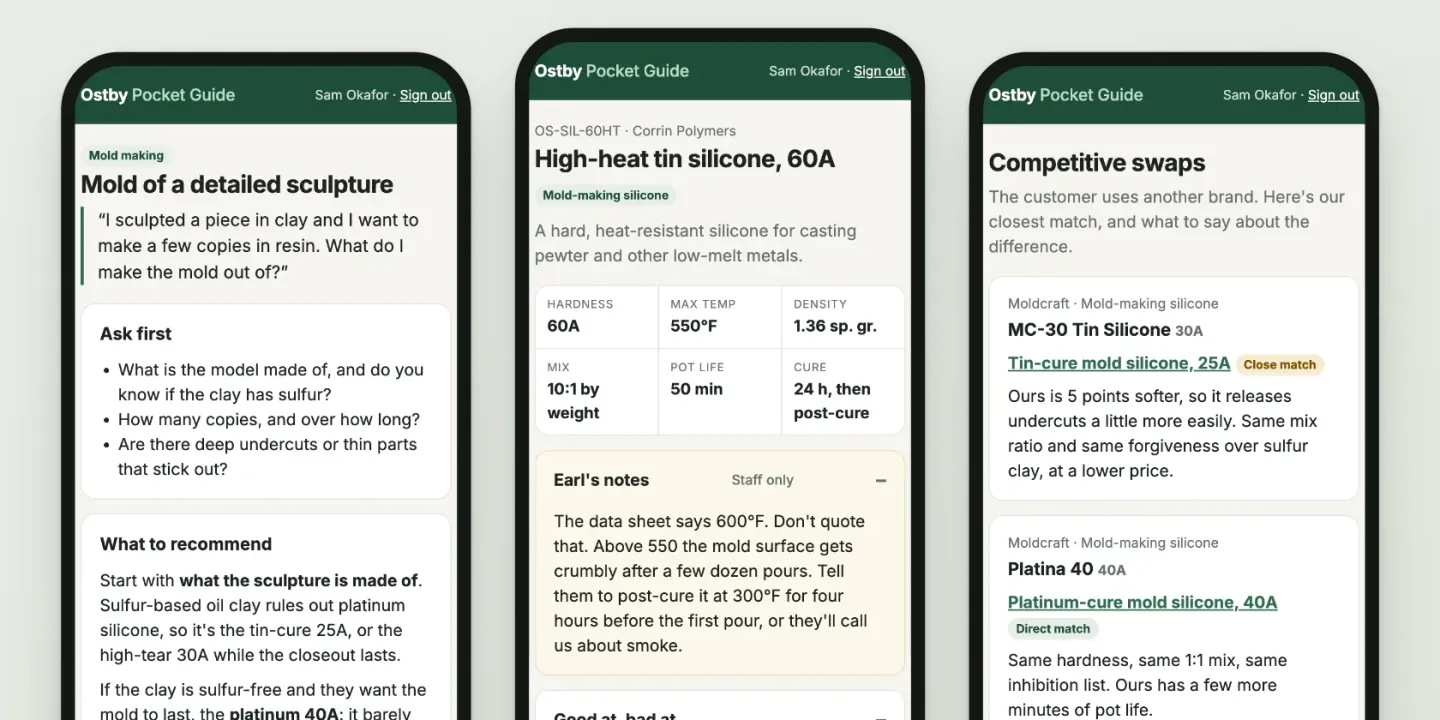
The reader side is a private website. You design the reference pages however you like: in Total CMS's Site Builder, in Stacks, or by hand. A page can require a login and membership in a group: in Site Builder by turning on the page's login requirement, in Stacks with Page Lock. Parts of a page can show only to some groups, so supplier costs or internal notes appear only for the people cleared to see them; in Stacks, Section Lock does it without code.
Readers sign in through their own login collection, so they can read the reference without any access to the admin.
Build the pages mobile-first: the people who need answers are usually on a phone, on a sales call, or on a job site. Layer the depth rather than showing it all at once. The spec summary sits on top; strengths, weaknesses, and private notes open in accordions, drill-downs, or tabs. That layering is what a spreadsheet with hidden cell comments was trying to do.
Getting the knowledge out of people's heads
The hardest part isn't the software. Experts are trained to answer questions, not to write documentation; hand them an empty form and you'll get very little. So interview them, and let an AI assistant do the structuring.
- Record a conversation. Sit down with the expert on a video call, record it, and walk through products one at a time: what it's for, when not to use it, what customers get wrong.
- Clean the transcript. Ask an assistant such as Claude to pull every proper name out of the transcript with its best guess at the spelling. Correct that list once, then have it apply the fixes. Supplier and product names are where transcription goes most wrong.
- Structure it. Give the assistant your schema's field names and ask it to turn the transcript into a CSV or JSON file with one row per product.
- Import it. Total CMS imports CSV and JSON into a collection. Column names map to fields; images and spec sheets are picked up from paths on the server. Large imports run in the background through the job queue.
- Have the expert review it in the forms. Correcting a filled-in record is far easier than writing one from scratch.
Expect messy data and more than one pass. A second conversation on the same product line a month later often turns up a whole new layer of the expert's reasoning. Set expectations both ways: it isn't as hard as people fear, and it won't be finished by next Tuesday.
An AI assistant can also skip the file and write records straight into the collection over Total CMS's built-in MCP server. Those writes go through the same validation and permissions as a person using the admin, and every save keeps the version it replaced. Either way, the expert has the final word.
Keeping private knowledge private. You decide what an AI assistant can see. Each collection is closed to outside agents until you open it, and any individual field (supplier costs, candid notes) can be hidden from every agent, your own included, while staying visible to signed-in staff. In the sample, Earl's notes, supplier costs and what goes wrong on each job are hidden that way. For conversations you'd rather not send to a cloud service at all, a model running on your own hardware can do the transcript cleanup and structuring, and connect to Total CMS the same way.
Where the ERP fits
A pocket guide doesn't replace your ERP; it sits beside it. Prices and stock stay authoritative in the ERP and sync in on a schedule, joined on the item number. Expert notes and selection guidance live only in Total CMS, so a sync never overwrites them. Total CMS alongside your ERP covers the connection patterns in detail.
After the first guide
Once colleagues see one form that captures their knowledge cleanly, requests follow. That's a good sign: each one replaces a spreadsheet, an email chain, or a question to a busy expert. Typical second and third projects:
- Lab and test logs. Each test is a record with its parameters, results, photos, and a link to the product tested.
- Quality and ISO incident reports. A form with photos and repeating line items; each submission is saved, emailed to the right people, and exportable to CSV.
- Troubleshooting databases. Symptom, cause, and fix, linked to the products involved, so the field team searches instead of calling in. One company rebuilt a broken troubleshooting database out of its ERP in about three hours.
- Specification tables. One set of records feeding every page that shows specs, instead of copies that drift apart.
- Paper and PDF forms. Many become web forms that save a structured record instead of a file nobody can search.
- Training material. Procedures and videos behind the same login as the pocket guide.
The return on these is mostly cost, not revenue: fewer interruptions, faster onboarding, less time hunting for answers. And insurance against the day a key expert retires.
Why not the tools you already have
Each of these does part of the job; none is two-way, structured, private, and mobile at once.
| Tool | What it does well | Where it falls short for this |
|---|---|---|
| Spreadsheets | Fast to start; everyone knows them | Notes hide in cell comments, one file per person, unusable on a phone |
| ERP | System of record for items, prices, and orders | Built for transactions, not for reasoning and nuance |
| CRM | Customers and pipeline | Tracks customers, not products, manufacturers, or competitors |
| Note and wiki apps | Free-form writing | Not structured or linked by product, so every expert writes it differently |
| BI dashboards | Answering questions from existing data | One-way: experts can't write their reasoning back in |
| AI chat assistants | Fast answers from public knowledge | Your private knowledge isn't in them, and you may not want it there |
The closest description is a do-it-yourself system for product, manufacturer, and competitor knowledge, built by someone who isn't a full-time developer.
What to know before you start
- It's a content platform, not a transaction engine. Total CMS is built for information that is written occasionally and read constantly. Orders, inventory, and accounting belong in your ERP.
- Build on Pro. Custom collections, the REST API, automations, and AI writes are the core of a pocket guide, and they're Pro features: $395, a one-time license per domain with two years of updates.
- It runs on your own server. Any host with PHP 8.2 or later, with no database to set up. Content is stored as plain JSON files, so backing up is copying a folder.
- Someone has to own the structure. Experts maintain records, but one person should own the schemas and the reference pages. That can be an in-house technical person or a freelancer who builds it and hands it off.
You can try the full Pro feature set free for 45 days on a real domain, with no credit card.
The short version
Your experts' knowledge is too valuable to live only in their heads, and too sensitive to hand to someone else's platform. A pocket guide built on Total CMS keeps it structured, connected, and current, on a server you control, with the AI assistants you choose reading only what you allow.
It's just files. Your agent can read them, and nobody can take them.
Start a free 45-day trial (full Pro, no credit card) · Total CMS alongside your ERP