
Everything that explains your products is scattered today. Spec sheets sit in PDFs. Photos sit on a shared drive. Procedures sit in spreadsheets, and the know-how sits with a few people. None of it is a sale or an order, so your ERP was never built to hold it. This page shows how Total CMS holds it, how it joins your ERP on the item number, and what companies build with it.
New to ERPs? Start here
ERP stands for enterprise resource planning: the software a company runs its operations on. It holds the item master (every product, with its item number or SKU, description, and unit), plus prices, inventory, purchasing, orders, and invoicing, and often accounting and manufacturing too. Common names include SAP, Oracle NetSuite, Epicor, Infor, and Microsoft Dynamics.
If you build websites, you never need to work inside the ERP. An in-house IT person or an outside consultant owns it. What you need is the data it already has, and nearly every ERP can export it. The one request that unlocks everything:
"Can you export our items, with item number, description, and price, as a CSV file on a schedule?"
A few terms you'll hear:
| Term | What it means |
|---|---|
| Item number / SKU | The unique code for each product; your join key |
| Item master | The ERP's main product list |
| System of record | The system whose data wins when two disagree; for prices and stock, that's the ERP |
| Integration / middleware | Software that moves data between systems on a schedule or as changes happen |
What Total CMS is, in database terms
Total CMS is PHP software that runs on an ordinary web server you control, with no database server behind it. Each record is saved as a plain JSON file, checked against its schema on every save, and listed through a prebuilt index so pages stay fast.
If you think in database terms, the ideas map directly:
| Database | Total CMS |
|---|---|
| Table | Collection |
| Table definition | Schema |
| Row | Object |
| Column | Field |
| Foreign key | Relational field |
| View | Data View |
A schema works like a die: every object cut from it has the same fields and the same rules. Total CMS reads the schema and builds the editing form for you, with more than 30 field types, from text and prices to images, galleries, files, and repeating blocks.

Where it fits among the storage options you know
| Option | Best at | Tradeoff for content |
|---|---|---|
| Relational database (the one under your ERP) | Thousands of simultaneous transactions | A server to run and tune; not built for editors |
| Database-backed CMS | Websites, with plugins for most features | A database server and a stack of plugins to maintain |
| Hosted headless CMS | Fast start, nothing to host | Content and pricing live with the vendor, usually per seat or per record |
| Total CMS | Content that people write occasionally and many people read | Not a transaction engine |
The rule of thumb: use a database for high-volume transactions, where many records must change together and stay consistent. Use Total CMS for content that changes one record at a time and is read far more often than it's written, whether those changes come from a person, an ERP sync, or an AI assistant.
Connecting to your ERP
Total CMS doesn't replace the ERP; it sits beside it. The two meet on the one key they share, the item number. Use it as the object ID in your products collection, and every record lines up with the ERP without a lookup table.

Then choose how data flows in:
| Pattern | How it works | Good for |
|---|---|---|
| Scheduled import | The ERP exports items and prices as CSV or JSON, and Total CMS imports the file. Each import either adds new objects or updates existing ones by ID, so a sync that also brings in new items runs as two passes. Images and files can be processed in a background queue | Nightly or weekly syncs, no developer needed |
| REST API | An integration script or middleware creates, reads, and updates objects directly, secured with scoped API keys or OAuth 2.1 | Continuous syncs through middleware you already run |
| Automations | Short PHP handlers run on a schedule, on an incoming webhook from the ERP, or when content changes | A price change reaching the website the moment it happens |
Keep ownership clean. Prices, stock, and order data stay authoritative in the ERP, and syncs refresh them. Descriptions, photos, spec sheets, and expert guidance live only in Total CMS, so a sync never overwrites them.
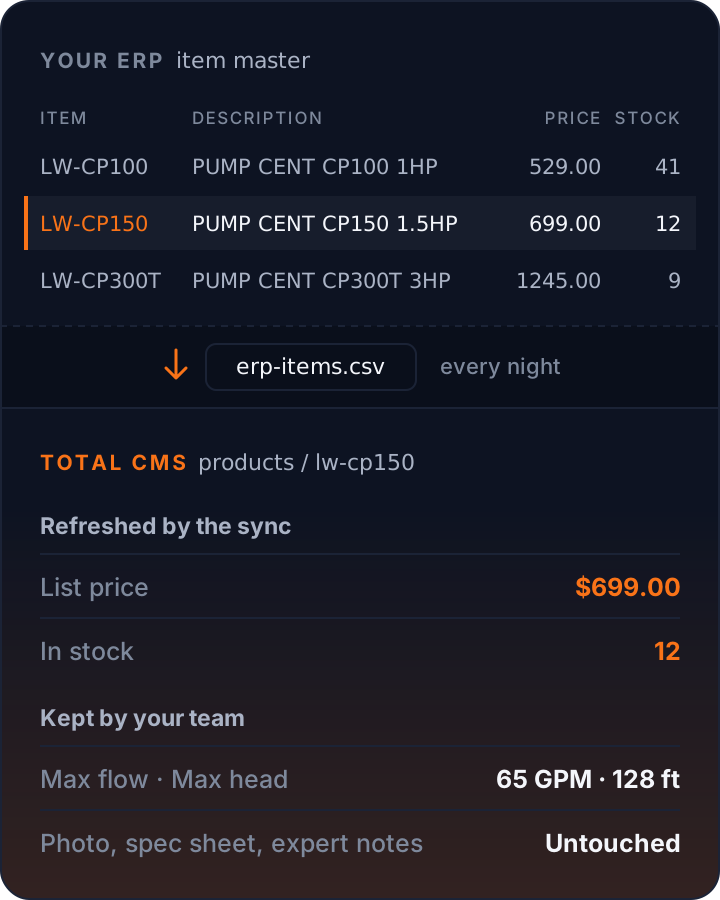
Data flows back out too. Forms save structured records and email them through the built-in mailer; collections export to CSV for the ERP or your reporting tools; and an automation can notify a CRM or help desk when a record changes.
What companies build on it
Product and specification library. An engineer updates density and temperature ratings, or a merchandiser updates sizes, materials and care instructions, in one form, and every spec table, comparison grid, and product selector reads from the same records. No more copies drifting apart across the website, PDFs, and sales sheets.
Distributor and customer portals. Logins and access groups decide who sees what: distributor price guides, field guides for installers, technical documents for approved customers. Whole pages can be locked to a group, and parts of a page shown or hidden by group, whether you build in Stacks or in Site Builder templates. Client, dealer and customer portals covers the details.
Pocket guides for the sales team. The expertise that lives in a few senior people's heads (which product fits an application, the closest match to a competitor's product, what to substitute when something is out of stock) captured in structured, linked records. Reps get a private, mobile reference that includes the honest notes you'd never publish. Experts are interviewed rather than handed empty forms, and an AI assistant turns the transcripts into records for import. A company pocket guide walks through building one.

Lightweight internal apps. A lab-test log, an ISO incident report, a troubleshooting database: each becomes a form with photos and repeating line items, saved as records, emailed to the right people, and exportable to CSV. Many of the PDF forms a business runs on are better this way.
Training. Course pages, procedures, and videos behind the same login, instead of another subscription. Company news, policies and forms fit there too: see a small company intranet.
One photo, every size. ImageWorks resizes, crops, and converts images on the fly, so editors upload one master and every page gets the version it needs. Watermarks protect distributor-only imagery.
Found by search and by AI. The Site Builder writes titles, descriptions, social images, and structured data from your content, and once a collection's sitemap is switched on, each new page joins it as it is published. The built-in MCP server lets AI assistants read the parts of your catalog you choose to make public.
How it usually grows
It rarely starts as a platform decision. At one industrial supplier, it started with a single product selector guide that an agency had quoted for. The company's president built a working version himself, then a reference for the product managers' knowledge, which until then lived in spreadsheets with notes hidden in cell comments.
Once colleagues saw one form that worked, requests followed: lab-test logging, ISO incident capture, a broken troubleshooting database rebuilt out of the ERP, and company-wide spec tables. Each replaced a spreadsheet or a question to a busy expert. Now the ERP feeds it, and it explains the company's products to employees, distributors, and customers alike.
- $9k–12k
- what the agency quoted for the selector guide he built himself
- 350 rows
- in each product manager's spreadsheet, with the notes in cell comments
- 3 hours
- to rebuild the broken troubleshooting database out of the ERP
AI assistants, on your terms
Every Total CMS Standard and Pro site is also an MCP server, the open standard AI assistants such as Claude use to work with outside tools. That cuts both ways for a company with private knowledge, so the defaults are closed:
- Nothing is exposed until you open it. A new collection is reachable only by an assistant connected as an administrator. You choose who else may reach it: specific API keys, signed-in staff, or the public.
- Sensitive fields can stay hidden. Supplier costs or candid notes can be stripped from every AI response while remaining visible to staff on the website.
- Writes follow the same rules as people. An assistant connected with a staff member's login can create and update records only where that person's access groups allow, through the same validation as the admin forms.
- Edits can be undone. Every save keeps the version it replaced, so a bad edit, from a person or an assistant, is one restore away. Bulk imports are the exception: they keep no history, because the ERP already holds the source.
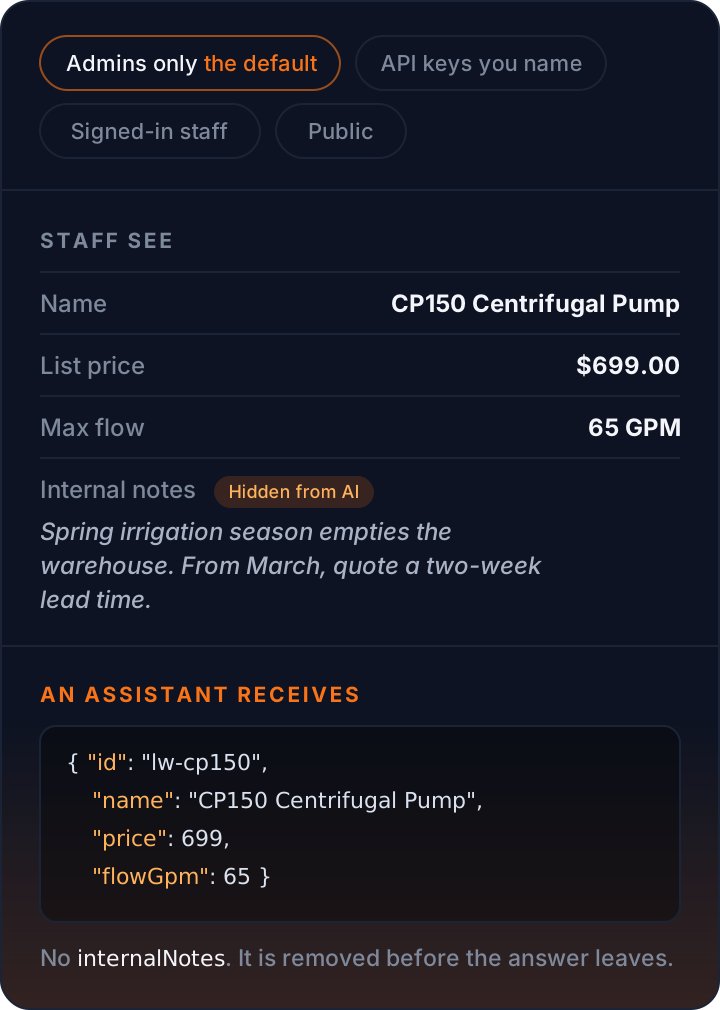
Or keep the AI in-house too. MCP is an open standard, not tied to any one AI company. Desktop apps that run open-weight models on your own hardware can connect to it as well. Point one at a Total CMS install on your own server, and private knowledge can be queried, summarized, or structured by AI without leaving your network. The same goes for the interview workflow: a local model can clean and structure transcripts of conversations you'd rather not send to a cloud service.
The practical upside: your public catalog becomes readable by the AI assistants your customers already use, while reps get answers from your own private reference instead of pasting company knowledge into a chatbot.
Why it fits a mid-market company
- Cost. Total CMS Pro is $395, a one-time license per domain with two years of updates. No per-seat or per-record pricing, however many employees or products you add.
- Control. It runs on your own server. Content is files you can copy, keep in version control, and back up with the tools you already use, and every record keeps its recent history.
- Skills you already have. Designers build visually in Stacks or write Site Builder templates, developers extend it with Twig and PHP, and editors only ever see clean forms.
- Small projects add up. Each new collection reuses the logins, permissions, and pages you already built, so the second and third internal app cost far less than the first.
Know the limits
- It's a content platform, not a transaction engine. Orders, inventory, and accounting stay in the ERP.
- Everything on this page assumes Pro. Custom schemas, the external REST API, automations, and AI writes are the core of this kind of build, and they're Pro features.
- Someone has to own the structure: an in-house technical person, or a freelancer who builds it and hands it off.
- It needs a host with PHP 8.2 or later. No database server is required.